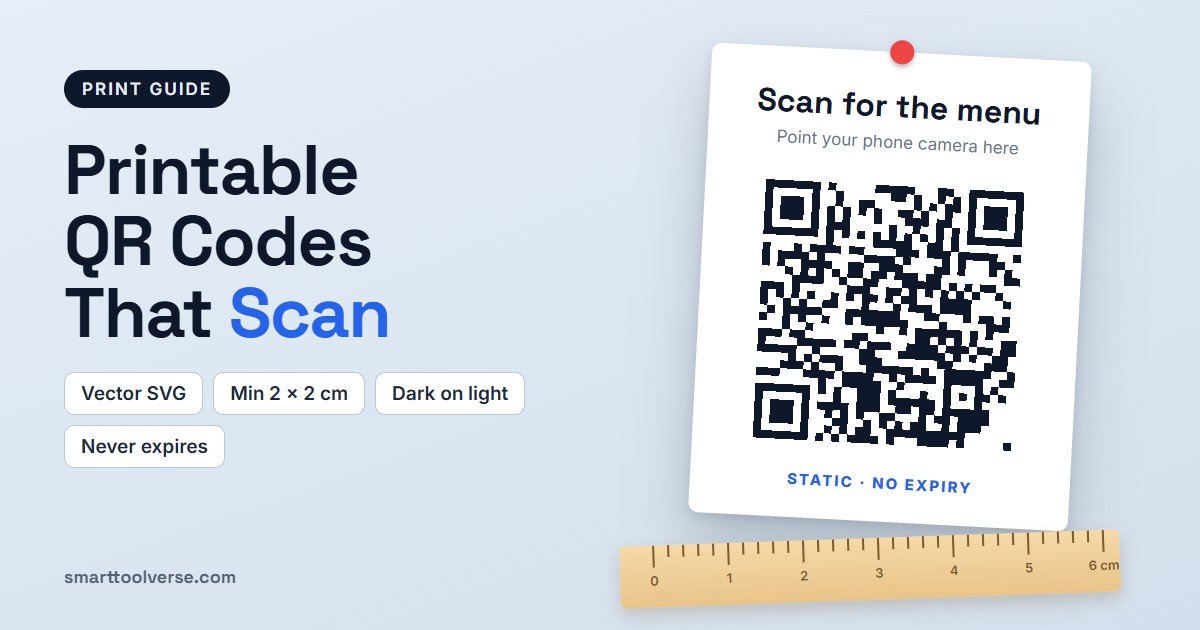
Short answer: for print, download your QR code as an SVG (vector, sharp at any size), print it at least 2 × 2 cm (0.8 in), keep it dark on a light background, leave white space around it, and test the printed proof with two phones. Our QR Code Generator is a free vector QR code generator: it makes static codes in your browser, with SVG and high-resolution PNG downloads, and they never expire.
Vector QR code (SVG) or PNG: which format to use
| SVG (vector) | PNG (image) | |
|---|---|---|
| Sharp when enlarged | Yes, at any size | Only up to its pixel size |
| Best for | Print: flyers, posters, packaging, signs, business cards | Screens: websites, slides, emails, social posts |
| Opens in | Illustrator, Inkscape, Figma, Affinity, Canva, browsers | Everything |
| Colour can be edited later | Yes, in a design app | Not easily |
A printer or designer will almost always ask for a vector file. If you can only use PNG, download the largest size (1024 × 1024 px in our generator) and do not enlarge it further.
How to generate a vector QR code for print, step by step
- Open the QR Code Generator and choose what the code holds: a website URL, WiFi login, contact card (vCard), email, phone or SMS, or plain text.
- Fill in the details. For a URL, paste the full address, including https://.
- Pick the colours: keep the code dark and the background light. The tool warns you if the contrast is too low or the colours are inverted.
- Choose the error correction level (see below). Medium suits most print jobs.
- Download Vector SVG for print, or High-Res PNG for screens.
- Print a test copy at the real size and scan it with two different phones before printing the full run.
How big should a printed QR code be?
A common rule: the code should be at least one tenth of the scanning distance, and never smaller than about 2 × 2 cm.
| Where it is printed | Scanning distance | Minimum size |
|---|---|---|
| Business card, label, packaging | 10 to 20 cm | 2 × 2 cm (0.8 in) |
| Flyer, menu, table card | 25 to 30 cm | 3 × 3 cm (1.2 in) |
| Poster | 1 m | 10 × 10 cm (4 in) |
| Window or wall sign | 2 to 3 m | 20 to 30 cm (8 to 12 in) |
| Billboard or banner | 5 m and more | 50 cm and up |
Longer content makes a denser code with smaller squares. If the code must be small, keep the URL short, for example by linking to your home page or a short path.
Colours and contrast
- Dark code on a light background. Black on white scans best. Dark blue, green, purple or brown work too.
- Avoid inverted codes (light squares on a dark background). Many phone cameras cannot read them.
- Keep strong contrast. Our generator warns below a 4:1 contrast ratio. Pale colours such as yellow, light grey or pastels on white often fail.
- No busy backgrounds behind the code. Put it on a plain light panel.
- Matte is better than glossy: shine and reflections can stop a camera from reading the code.
Error correction: L, M, Q or H
Error correction adds extra data so the code still scans when part of it is dirty, scratched, folded or covered. Higher levels are tougher but make the code denser.
| Level | Can recover | Use it for |
|---|---|---|
| L (Low) | about 7% | Screens and clean indoor print with long content |
| M (Medium) | about 15% | Most print: flyers, cards, menus |
| Q (Quartile) | about 25% | Packaging, stickers, outdoor signs, things that get handled |
| H (High) | about 30% | Harsh conditions, or when a small logo will cover part of the code |
Leave a white border (the quiet zone)
Scanners need an empty margin around the code to find its edges. The QR standard asks for a border four squares (modules) wide. Our downloads include a small white border; when you place the code on a coloured or busy design, add more white space around it, and never let text or images touch it.
A free QR code generator without expiration: static codes
A static code stores your link or text inside the pattern itself. It works for as long as the content does: if the website is online, the code keeps working, with no account and no subscription. Every code from our generator is static.
A dynamic code stores a short redirect link owned by the QR service. That lets you change the destination later and count scans, but it stops working if the service shuts down or your subscription ends. This is why some "free" QR codes suddenly break after a trial.
| Static | Dynamic | |
|---|---|---|
| Expires | Never | When the service or plan ends |
| Change the link later | No, make a new code | Yes |
| Scan statistics | Use UTM tags in your URL and your analytics | Built in |
| Account needed | No | Usually |
To track scans from a static code, add UTM parameters to the link, for example https://example.com/?utm_source=flyer&utm_medium=qr, and look for them in your analytics.
Final checklist before you print
- Scanned the printed proof with an iPhone and an Android phone
- The link opens the right page and the page works on mobile
- At least 2 × 2 cm, larger for longer scanning distances
- Dark on light, plain background, white space all round
- Vector SVG sent to the printer
- A short line next to it saying what it opens, such as "Scan for the menu"
FAQ
How do I create a vector QR code?
Generate it in our QR Code Generator and click Vector SVG. The SVG file can be scaled to any size in Illustrator, Inkscape, Figma, Canva or similar apps without losing quality.
What is the minimum size for a printed QR code?
About 2 × 2 cm (0.8 × 0.8 in) for something scanned up close, such as a business card. Go bigger for longer distances: roughly one tenth of the scanning distance.
Is there a free QR code generator without expiration?
Static QR codes do not expire, because the content is stored in the code itself. Dynamic codes from QR services can stop working when the plan ends. Our generator makes static codes only.
Can I change the colour of a QR code?
Yes, as long as the code stays dark on a light background with strong contrast. Our generator warns you when the colours may be hard to scan.
Why won't my printed QR code scan?
The usual causes are a code printed too small, low contrast or inverted colours, no white border, a glossy surface, or a damaged print. A long URL also makes the squares tiny; shorten it or print the code larger.