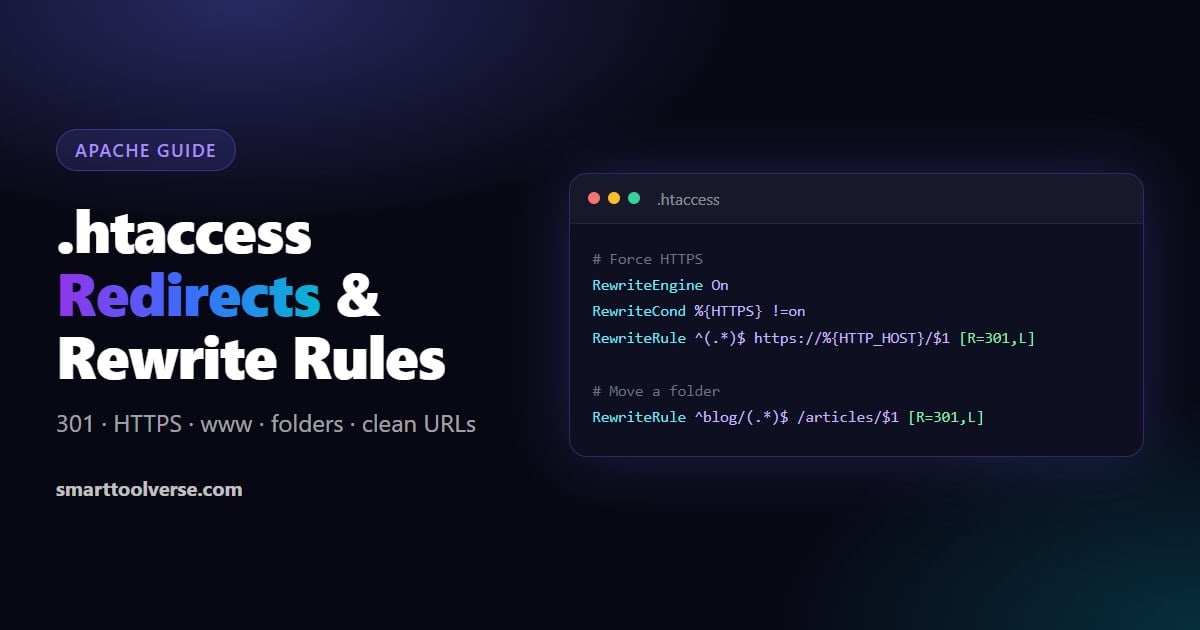
Short answer: to redirect a page with .htaccess, add Redirect 301 /old-page https://example.com/new-page to the .htaccess file in your site's root folder. For anything more (HTTPS, www, whole folders, query strings or clean URLs), use RewriteEngine On with a RewriteRule. This guide has a copy-ready rule for each case. To skip the syntax, pick a preset in our free .htaccess Redirect Generator: enter your domain and it writes the Apache and Nginx rules for you.
What .htaccess is, and when it works
.htaccess is a plain text file that the Apache web server reads on every request. Rules in it apply to the folder it sits in and everything below it, so redirects for the whole site go in the file in your site root (usually public_html). It works on most shared hosting, cPanel and WordPress hosts, and LiteSpeed servers read it too.
- It must be allowed. The server config needs
AllowOverride All(or at leastFileInfo) for the folder, or the file is ignored. - RewriteRule needs mod_rewrite. It is on at almost every host. If it isn't, any RewriteRule line causes a 500 error.
- Nginx does not read .htaccess. On Nginx the same redirects go in the server config. Our .htaccess Redirect Generator shows the Nginx version of every rule next to the Apache one.
Before you edit: download a copy of your current .htaccess. One typo gives the whole site a 500 error, and putting the old file back fixes it instantly.
301, 302, 307 or 308: which redirect to use
| Code | Meaning | Use it when | SEO effect |
|---|---|---|---|
| 301 | Moved permanently | A page, folder or domain has moved for good | Google moves the ranking signals to the new URL |
| 308 | Permanent, keeps the method | Like 301, but form posts (POST) must stay POST | Same as 301 |
| 302 | Found (temporary) | A short-term move: a sale page, maintenance, A/B test | The old URL stays indexed |
| 307 | Temporary, keeps the method | Like 302, but POST must stay POST | Same as 302 |
For SEO, use 301 for anything permanent. Browsers cache 301s hard, so while you are testing a new rule use 302, and switch to 301 once it works.
Redirect a single page
The simplest way is the Redirect line. It needs no RewriteEngine:
Redirect 301 /old-page https://example.com/new-pageWatch out: Redirect matches the start of the path, so /old-page/photos also goes to /new-page/photos. To redirect only that exact URL, use RedirectMatch or a RewriteRule:
# Exact match with RedirectMatch
RedirectMatch 301 ^/old-page/?$ https://example.com/new-page

# Same thing with mod_rewrite
RewriteEngine On
RewriteRule ^old-page/?$ /new-page [R=301,L]
In .htaccess, the RewriteRule pattern is matched without the leading slash: write ^old-page$, not ^/old-page$. This is the most common reason a rule "does nothing".
Pick one method per file. Mixing Redirect lines with RewriteRule lines can give confusing results, because the two Apache modules do not run in the order they appear in the file.
Redirect many pages at once
List one line per page. Put the most specific rules first:
RewriteEngine On
RewriteRule ^about-us/?$ /about [R=301,L]
RewriteRule ^contact-us/?$ /contact [R=301,L]
RewriteRule ^services/web-design/?$ /web-design [R=301,L]
Redirect a whole folder
To move everything under /blog/ to /articles/ and keep the rest of the path:
RewriteEngine On
RewriteRule ^blog/(.*)$ /articles/$1 [R=301,L]
(.*) captures whatever comes after blog/, and $1 puts it back in the new URL, so /blog/my-post goes to /articles/my-post.
Redirect an old domain to a new domain
Put this in the .htaccess of the old domain. Every page goes to the same path on the new domain:
RewriteEngine On
RewriteCond %{HTTP_HOST} ^(www\.)?old-domain\.com$ [NC]
RewriteRule ^(.*)$ https://new-domain.com/$1 [R=301,L]
Keep the old domain registered and the redirect in place for at least a year, which is what Google recommends for site moves. Then add the new domain in Search Console and use its Change of Address tool.
Force HTTPS
This sends every plain-HTTP request to the same URL on HTTPS. It is the rule our generator writes for the "Force HTTPS" preset:
RewriteEngine On
RewriteCond %{HTTPS} !=on
RewriteRule ^(.*)$ https://%{HTTP_HOST}/$1 [R=301,L]
Behind Cloudflare (Flexible SSL), a load balancer or a proxy? The server only ever sees HTTP, so %{HTTPS} is always off and the rule loops ("too many redirects"). Check the header the proxy sends instead:
RewriteEngine On
RewriteCond %{HTTP:X-Forwarded-Proto} !https
RewriteRule ^(.*)$ https://%{HTTP_HOST}/$1 [R=301,L]
Redirect www to non-www (or the reverse)
Choose one version of your domain and send the other to it, so Google indexes each page only once. www to non-www:
RewriteEngine On
RewriteCond %{HTTP_HOST} ^www\.(.+)$ [NC]
RewriteRule ^(.*)$ https://%1/$1 [R=301,L]
Non-www to www:
RewriteEngine On
RewriteCond %{HTTP_HOST} !^www\. [NC]
RewriteRule ^(.*)$ https://www.%{HTTP_HOST}/$1 [R=301,L]
%1 is the part captured by the RewriteCond (the domain without www), the same way $1 is the part captured by the RewriteRule.
HTTPS and non-www in one redirect
Two separate rules can send http://www.example.com through two redirects in a row (a redirect chain). This version does both in one step:
RewriteEngine On
RewriteCond %{HTTPS} off [OR]
RewriteCond %{HTTP_HOST} ^www\. [NC]
RewriteCond %{HTTP_HOST} ^(?:www\.)?(.+)$ [NC]
RewriteRule ^ https://%1%{REQUEST_URI} [R=301,L,NE]
Redirect a URL with a query string
A RewriteRule never sees the part after ?. Match it with a RewriteCond on %{QUERY_STRING}. To send /page?id=5 to /new-page:
RewriteEngine On
RewriteCond %{QUERY_STRING} ^id=5$
RewriteRule ^page$ /new-page [R=301,L,QSD]
QSD drops the old query string (otherwise Apache adds ?id=5 to the new URL). Use QSA instead when you want to keep it and add your own. Our generator handles this automatically: type /page?id=5 in the "From" box of the path redirect preset.
Rewrite vs redirect: clean URLs without .html or .php
A redirect (with R=) sends the visitor to a new URL, and the address bar changes. A rewrite (no R) serves a different file behind the scenes, and the address bar stays the same. Rewrites are how "pretty" URLs work. Serve /product/42 from product.php?id=42:
RewriteEngine On
RewriteRule ^product/([0-9]+)/?$ product.php?id=$1 [L,QSA]
Serve /about from about.html, and redirect old .html links to the clean URL:
RewriteEngine On

# 1. Redirect /about.html to /about (THE_REQUEST stops this from looping)
RewriteCond %{THE_REQUEST} \s/([^.\s?]+)\.html[\s?] [NC]
RewriteRule ^ /%1 [R=301,L]

# 2. Serve /about from about.html
RewriteCond %{REQUEST_FILENAME} !-d
RewriteCond %{REQUEST_FILENAME}.html -f
RewriteRule ^(.+)$ $1.html [L]
For PHP files, change .html to .php in both rules.
Remove a page for good (410 Gone)
If a page is deleted and has no replacement, a 410 tells search engines to drop it faster than a 404:
RewriteEngine On
RewriteRule ^old-promo/?$ - [G]
RewriteRule cheat sheet
Every rule has the form RewriteRule pattern target [flags], and the RewriteCond lines above it must all match for it to run.
Flags
| Flag | What it does |
|---|---|
| R=301 | Redirect with this status code (301, 302, 307 or 308). Without R it is an internal rewrite. |
| L | Last: stop processing the other rules for this request |
| NC | No case: match upper and lower case the same |
| QSA | Query string append: keep the original query string and add the new one |
| QSD | Query string discard: drop the original query string |
| NE | No escape: keep characters like # and % as they are in the target |
| F | Forbidden: return 403 |
| G | Gone: return 410 |
| OR | On a RewriteCond: this condition OR the next one (the default is AND) |
Pattern symbols
| Symbol | Meaning | Example |
|---|---|---|
| ^ and $ | Start and end of the path | ^shop$ matches only "shop" |
| (.*) | Capture anything | ^blog/(.*)$ |
| $1, $2 | Text captured by the RewriteRule | /articles/$1 |
| %1, %2 | Text captured by the last RewriteCond | https://%1/$1 |
| \. | A literal dot | example\.com |
| [0-9]+ | One or more digits | ^product/([0-9]+)$ |
| /? | An optional trailing slash | ^about/?$ |
Useful server variables
| Variable | Holds |
|---|---|
| %{HTTP_HOST} | The domain that was requested, e.g. www.example.com |
| %{HTTPS} | "on" when the request came over HTTPS |
| %{REQUEST_URI} | The path, with the leading slash, e.g. /blog/post |
| %{QUERY_STRING} | Everything after the ?, e.g. id=5&ref=x |
| %{HTTP_REFERER} | The page the visitor came from |
| %{REQUEST_FILENAME} | The file path on the server (used with -f and -d) |
Where to put the rules (and WordPress)
- Put
RewriteEngine Ononce near the top of the file. Repeating it is harmless, but once is enough. - Put redirects before rewrites. Domain-wide rules (HTTPS, www) come first, then single-page redirects, then clean-URL rewrites.
- On WordPress, put your rules above
# BEGIN WordPress. WordPress rewrites everything between# BEGIN WordPressand# END WordPresswhen you save permalinks, so rules inside that block get deleted.
How to test a redirect
- Use a private window, or clear your cache: browsers remember 301s and keep using an old one even after you change the rule.
- Check the status code with curl:
curl -I http://example.com/old-pageshows the code (301, 302…) and theLocationit points to. - Count the hops. Each URL should reach its final page in one redirect. Chains (A → B → C) waste crawl budget and slow visitors down.
- Then check the page itself: our free SEO Score Checker confirms the final URL loads over HTTPS with the right canonical.
Troubleshooting
| Problem | Likely cause | Fix |
|---|---|---|
| "Too many redirects" (ERR_TOO_MANY_REDIRECTS) | The rule matches its own target, or HTTPS is handled by a proxy | Add a RewriteCond so the rule skips URLs that are already correct; behind Cloudflare or a load balancer use the X-Forwarded-Proto rule |
| 500 Internal Server Error | A typo, or mod_rewrite is not enabled | Check the server error log (cPanel → Errors); restore your backup; ask the host to enable mod_rewrite |
| The rule does nothing | Leading slash in the pattern, AllowOverride is off, or the server is Nginx | Remove the leading / from the pattern; ask the host about AllowOverride; on Nginx use the Nginx rules |
| Old redirect still happens | The browser cached a 301 | Test in a private window or another browser |
| ?id=5 ends up on the new URL | Apache passes the query string on by default | Add the QSD flag |
Generate the rules instead of writing them
Our free htaccess rewrite rule generator writes these rules for you. Choose a preset, enter your domain, and copy the result:
- Force HTTPS, www to non-www, non-www to www, and single-page redirects (including URLs with query strings)
- Your choice of 301, 302, 307 or 308
- Apache .htaccess and Nginx versions side by side
- Warnings for redirect loops and for sites behind a proxy or CDN
- Extra presets: block image hotlinking, gzip compression with browser caching, and custom 404 and 500 pages
- For anything else, describe the rule in plain English and the AI writes it
FAQ
Does a 301 redirect pass SEO value?
Yes. Google treats a 301 (and a 308) as a strong signal that the new URL should replace the old one in search results, and the old page's ranking signals move to it. Temporary 302 and 307 redirects keep the old URL indexed.
How long should I keep a redirect?
Google recommends at least one year. If other sites still link to the old URL, keep it for good: a redirect costs almost nothing.
What is the difference between Redirect and RewriteRule?
Redirect (mod_alias) is simple and fine for moving single pages. RewriteRule (mod_rewrite) can check conditions such as the domain, HTTPS or the query string, capture parts of the URL and rewrite internally, so it is what you need for everything else.
Where is the .htaccess file?
In your site's root folder, usually public_html or www. Its name starts with a dot, so it is hidden: in cPanel File Manager open Settings and tick "Show Hidden Files". If there is none, create a plain text file named exactly .htaccess.
Can I use .htaccess on Nginx?
No. Nginx ignores .htaccess, so the rules go in the server block of your Nginx config, followed by nginx -s reload. The .htaccess Redirect Generator gives you the Nginx version of each rule.
Related Articles

How Much Does AdSense Pay? Earnings per 1,000 Views, RPM by Niche and How to Calculate Yours
How much AdSense really pays: the earnings formula, typical page RPM by niche and audience country, the traffic you need for $100, $1,000 or $3,000 a month, what raises or lowers your RPM, and when Google pays you.
7 min read
What WordPress Theme Is That? 4 Ways to Find Out Any Site's Theme and Plugins
Four ways to find out which WordPress theme a website uses, from a one-click theme detector to reading the page source and the theme's style.css, plus how to spot child themes and plugins and what it means when the theme is hidden.
5 min read
Open Graph and Twitter Card Tags: Image Sizes, Examples and How to Test Link Previews
What Open Graph and Twitter (X) card tags do, a copy-ready set for any page, the image sizes that avoid cropping, and how to test and refresh link previews on Facebook, LinkedIn, X, WhatsApp and Slack.
6 min read
Try Our Smart Tools
Put what you've learned into practice with our suite of AI-enhanced tools and smart calculators.